00 快速开始:四步用起来

  1. 01

    安装却话

    下载却话 ,右键选择“以管理员身份运行”进行安装。如遇到 Windows 拦截提示,放行即可或参考 安装步骤。

  2. 02

    准备大模型开放平台账户密钥(此处以 DeepSeek 为例)

    打开所选模型服务商的开放平台,注册并充值,再创建一条密钥(API key,通常以 sk- 开头)。费用按用量计,由服务商收取。下文统一以 DeepSeek 为例。

  3. 03

    填入密钥,选一个文件夹

    打开却话 → 设置 → 选择 Deepseek → 粘贴密钥 → 点“选择”挑一个专用文件夹(根工作区,也就是允许它读写的范围)→ 保存并应用。

  4. 04

    可以使用却话了

    配置完成后即可使用却话;具体做什么任务,由你自己定义,写在输入框里发送就行。

01 安装步骤

首次运行可能遇到 2–3 个 Windows 提示,这是 Windows 自带的安全检查;按第 2 步操作即可。

安装前确认

系统
Windows 10 / 11 64 位。暂不支持 macOS、Linux 和 32 位 Windows。
权限
安装需要管理员权限。
空间
建议预留 1GB 以上可用磁盘空间。
网络
能正常访问Internet。
2

通过 Windows 的安全确认

双击安装包后,Windows 可能弹出下面几种提示之一。这是 Windows 对首次运行应用的常规安全检查;不同版本的文字会略有差异,按提示继续即可。

  • 智能应用控制:出现拦截提示时,点“正常”关闭。
  • Windows SmartScreen:出现“Windows 已保护你的电脑”时,点“更多信息”,再点“仍要运行”。
  • 用户账户控制:询问是否允许此应用对你的设备进行更改时,点“是”。

如果双击没有反应,直接右键安装包 → 选择“以管理员身份运行”。安装时若选择“为所有用户安装”可能再弹一次“用户账户控制”,同样点“是”。

3

完成安装,选择给谁用

向导中可以选择安装位置,以及“为所有用户安装”还是“仅为我安装”。前者需要管理员权限,装到所有账户都能用的位置;后者只影响当前账户。不确定就保持默认。

安装完成后启动却话。首次启动还没有密钥,任务输入框会提示先到“设置”完成模型配置,这是正常状态。

4

确认首次启动状态

左侧导航会显示“新任务”、“历史任务”、“设置”。进入“设置”配置大模型相关服务信息。

02 配置步骤

以 DeepSeek 为例。设置里也能换成 Kimi、智谱 GLM 、千问或自定义模型服务。

先在大模型开放平台创建密钥(以Deepseek为例)

密钥(API key)是模型账户的调用凭证,却话用它替你向 DeepSeek 发请求。注意:它不是你的 DeepSeek 账号密码。

  1. 登录开放平台

    打开 platform.deepseek.com/api_keys,按页面提示注册或登录你的 DeepSeek 开放平台账户。

  2. 确认账户有余额

    在平台的充值或账户页面完成充值。

  3. 进入 API Keys 页,创建一条密钥

    在 API Keys / 密钥管理区域点“创建”,生成一条新密钥。

  4. 立即安全保存密钥

    复制新生成的完整密钥并妥善保管。不要通过聊天、邮件、屏幕共享或代码提交传播它;怀疑泄露时应立刻在开放平台中撤销并新建。

  5. 查看当前官方模型与计费说明

    DeepSeek 的模型可用性和账户规则会变化。配置或报错排查时,查看 DeepSeek API 文档 中的当前模型、价格和状态说明。

在却话中连接大模型(以Deepseek为例)
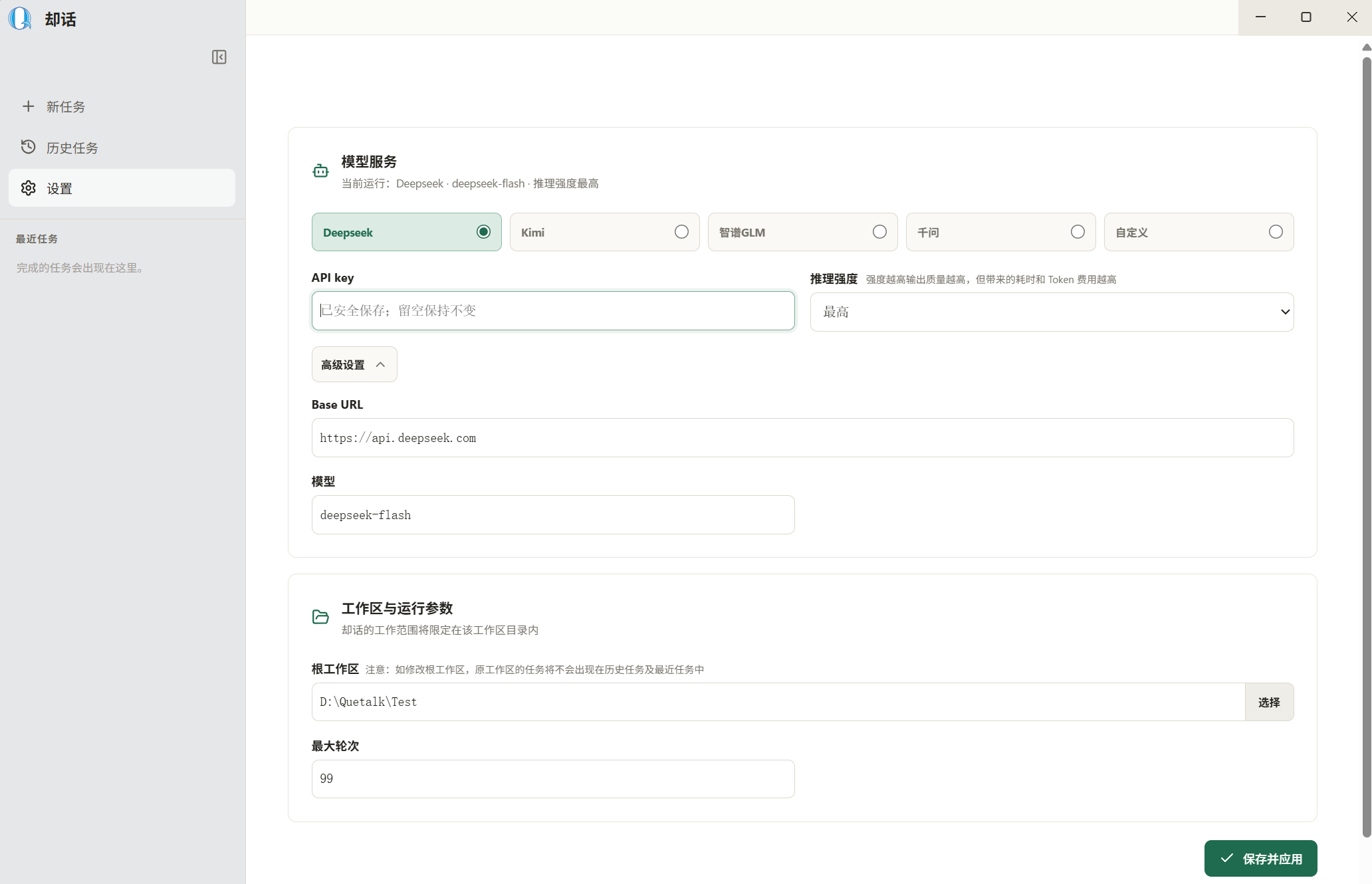
却话设置页:选择 Deepseek,填写 Base URL、模型、API key、工作区与最大轮次
  • 设置页:选择服务商,粘贴API key、选择根工作区,最后点右下角“保存并应用”。
设置项如何填写
服务商 在“设置”页点击 Deepseek
Base URL https://api.deepseek.com
模型 deepseek-flash
API key 粘贴刚创建的完整密钥
工作区 点“选择”,选一个专用文件夹(建议新建)
最大轮次 默认 99;简单任务 20–30 就够,达到最大轮次会停止任务,输入框发送继续,即可继续进行当前任务。

03 如何使用:从一个具体任务开始

1
新任务

点击左侧“新任务”,或在历史页右上角点击“新任务”,在输入框写任务。

2
可添加附件

用“添加文件”附上需求、报错或相关文件;剪切板截图可使用Ctrl+V快捷键输入

3
发送并看过程

Enter 发送,Shift + Enter 换行。执行时可以查看思考过程,也可以随时停止。

4
检查结果

如果生成结果包含文件,可以打开文件进行预览。
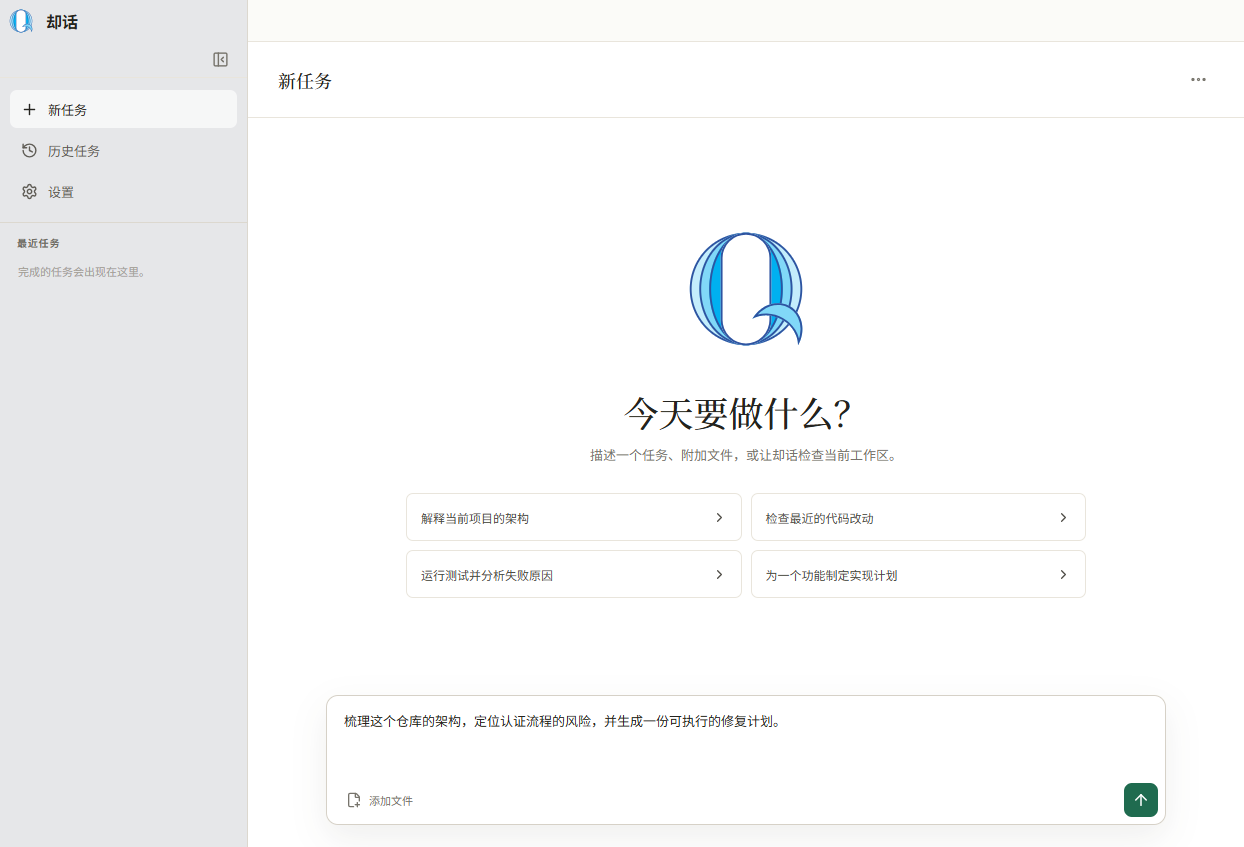
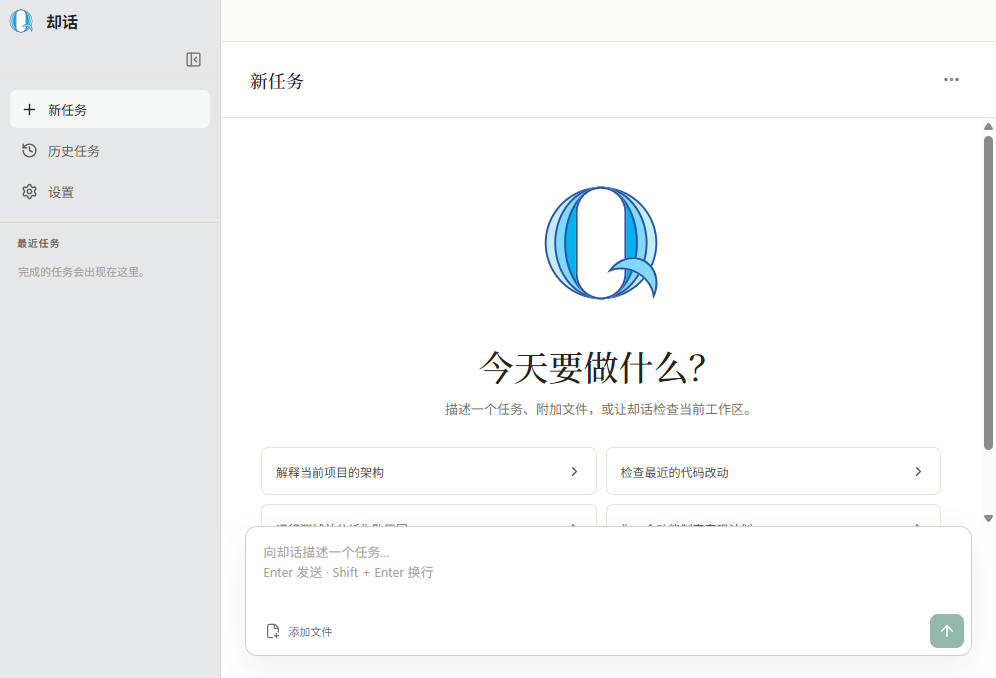
却话新任务页:左侧导航、中间是任务输入框,上方是推荐问题
  • 新任务页:把任务写在输入框;上方推荐问题可以点一下填入,再修改发送。

04 界面功能

任务输入、附件与停止

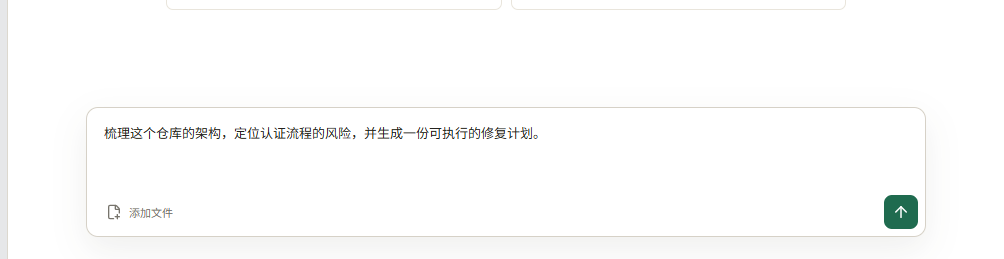
却话底部输入区:添加文件、发送与停止按钮
  • 输入任务:在底部输入框描述目标。Enter 发送,Shift + Enter 换行。
  • 添加文件:点击“添加文件”可选择多个文件;也可以把图片粘贴到输入框。附件会显示在输入框上方,可逐个点 × 移除。
  • 发送:模型配置就绪且任务内容非空时,右下角箭头按钮可用。
  • 停止生成:流式输出期间,发送按钮会变成方形停止按钮。点击后当前请求停止,不会清除已有内容。
  • 轮次限制:达到最大轮次时,会自动停止任务,输入框发送继续,即可继续进行当前任务。

如何打开思考模式
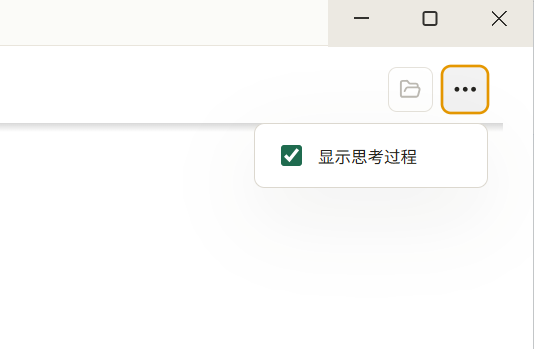
却话更多操作菜单中的“显示思考过程”勾选项
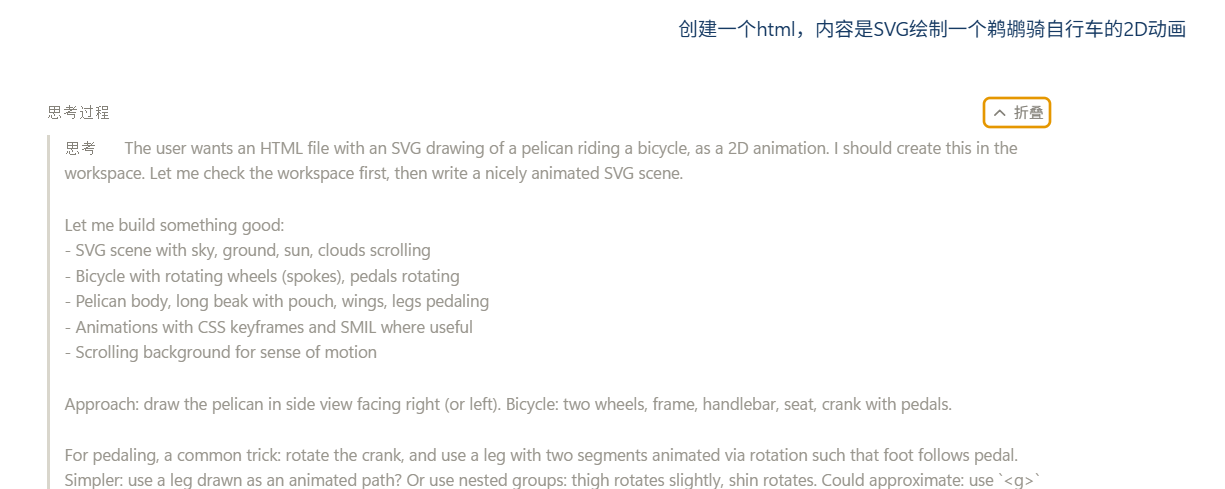
却话对话框中的思考过程“展开/折叠”按钮
  • 在任务页标题右侧点 更多操作(三点图标)。
  • 勾选 显示思考过程 显示,取消勾选即隐藏。该偏好会保存在当前电脑的本地设置中。
  • 当模型返回思考内容或执行步骤时,每条回复上方会出现“思考过程”。
  • 点其中的 展开 / 折叠 可只收起当前消息的推理和步骤。步骤会标示第几轮、使用的工具和“思考中 / 执行中 / 已完成 / 失败”等状态。

会话内问题导航
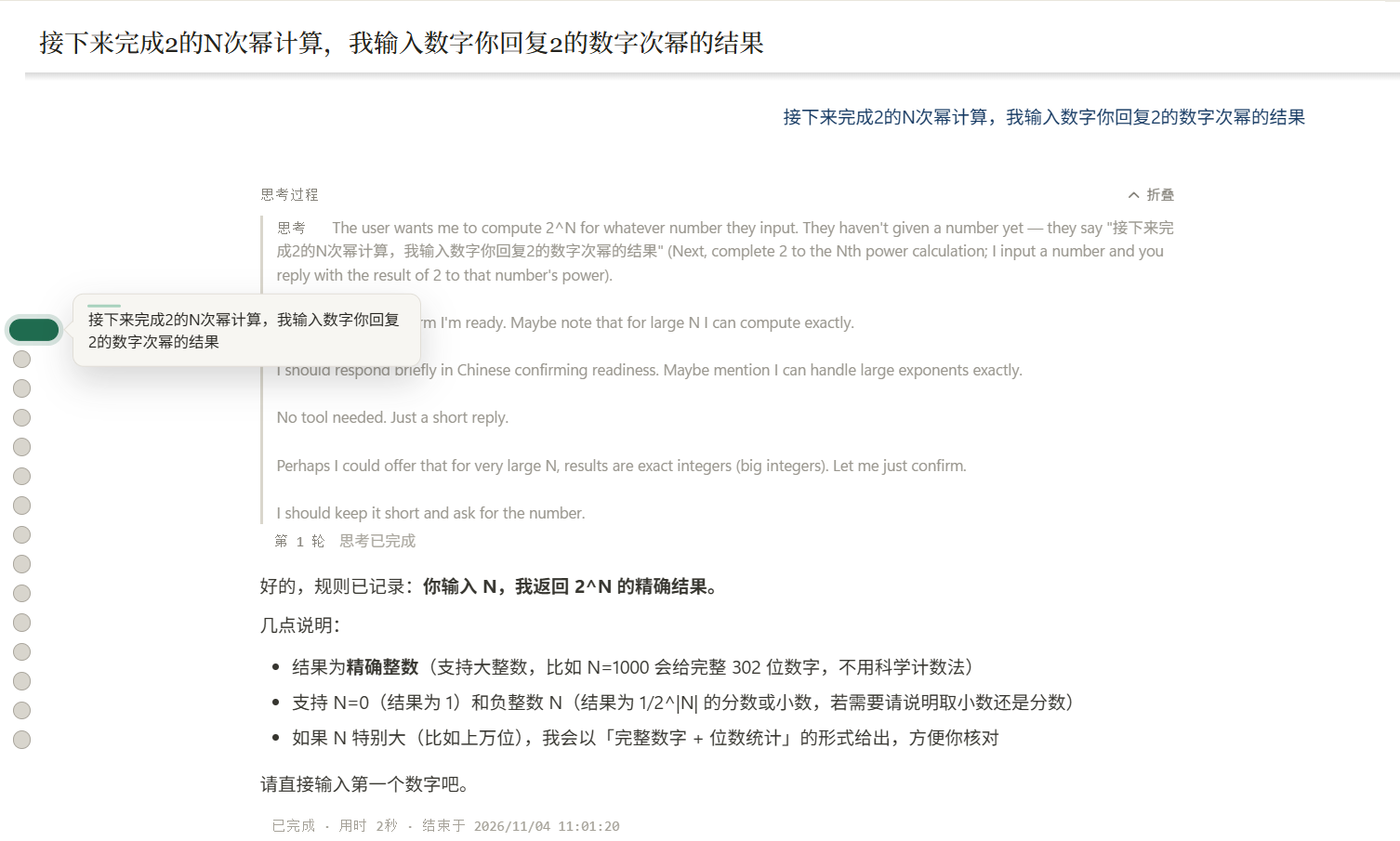
却话会话内问题导航:对话区左侧一列圆点,悬停时显示该问题的摘要预览
  • 同一会话中累计至少两条用户问题后,对话区左边会出现一列圆点。
  • 每个圆点对应一条你发送过的问题。鼠标悬停或键盘聚焦圆点,会显示该问题的摘要预览。
  • 点击圆点,界面会平滑滚动到对应的用户消息,适合在长会话里回看“当时问了什么”。
  • 问题很多时,圆点列表自身可滚动(用鼠标滚轮操作)。

历史记录:浏览、继续与删除
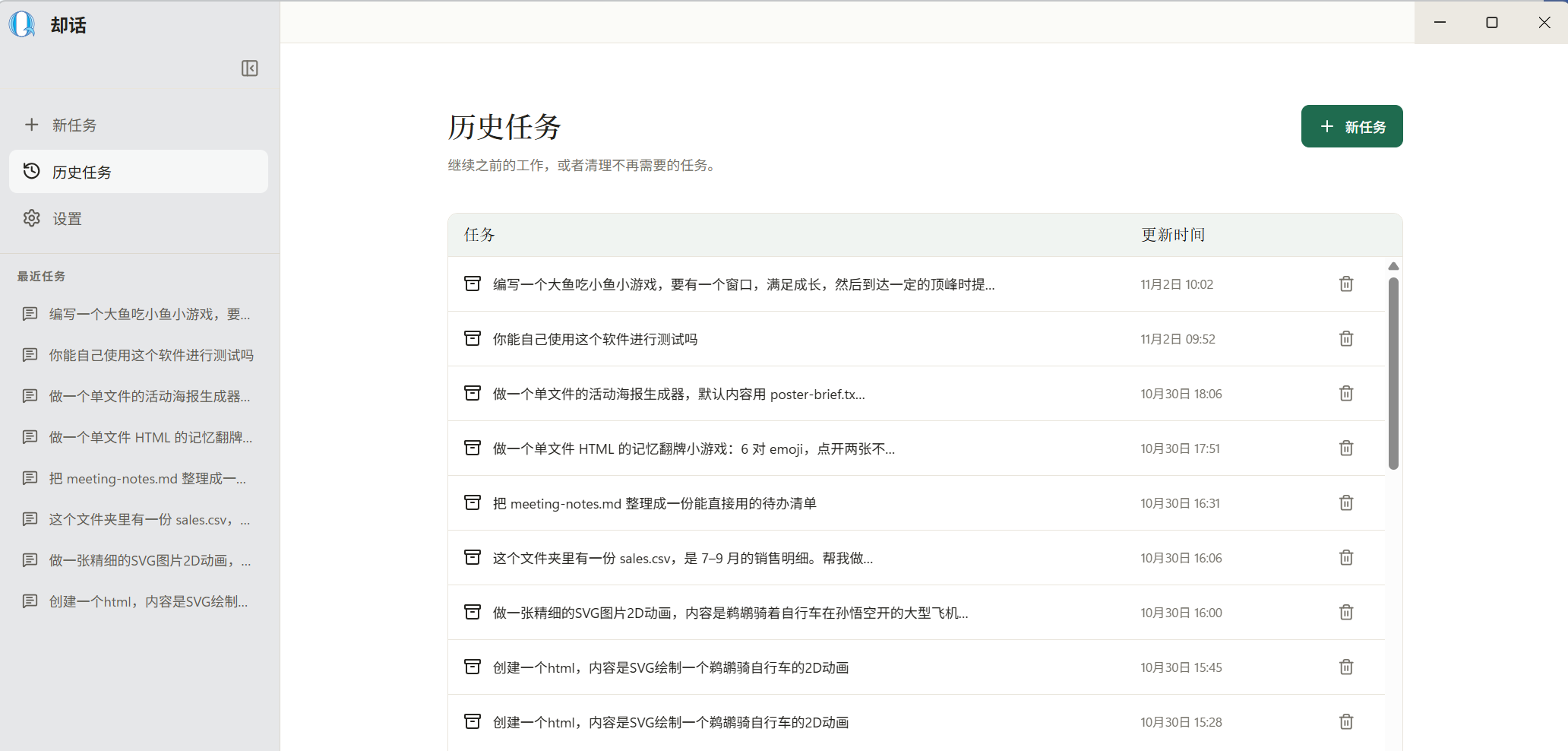
却话历史任务入口与最近任务列表
  • 点左侧 历史任务。列表按任务展示标题和更新时间。
  • 点击某一行的任务标题,打开该会话并继续提问。历史内容会被恢复为同一任务上下文。
  • 点击该行最右侧的删除图标,会删除该历史任务。删除没有撤销入口。

生成文件、预览与源码
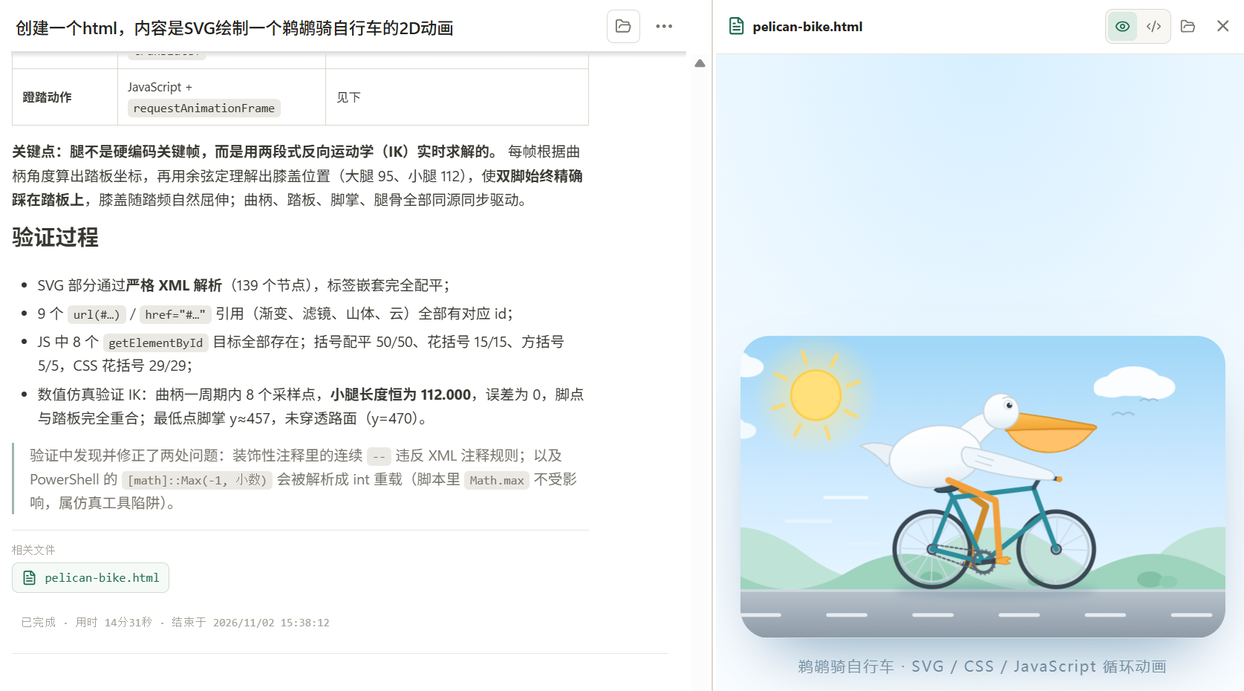
却话任务页:回复下方的“相关文件”列表,右侧是 pelican-bike.html 的渲染预览与预览/源码切换按钮
  • 当却话成功写入或修改文件后,回复下方会出现 相关文件 列表。点击即可打开文件。
  • 右侧文件窗支持文本格式的文件 预览 和 源码 查看,Markdown、HTML 和图片可以直接看效果。
  • 点 打开文件夹(Open folder) 可在系统文件管理器中打开文件所在目录。

05 遇到问题

常见报错:先对照这张表

现象可能原因怎么处理
发送按钮灰色,点不了 密钥没保存、文件夹没选、本地服务还没准备好,或输入框为空 回“设置”检查并“保存并应用”,等待应用保存”。
报 401 / Invalid API key(密钥无效) 密钥复制不全、已撤销或填错 重新复制完整密钥;不行就新建一条再填。
报 402 / Insufficient Balance 账户余额不足 到模型服务平台充值后重试。
报 404 / model not found 模型名称不可用或已下线 改回预设 deepseek-flash,或按官方文档换一个名称。
连接超时 / 网络错误 网络、代理或接口地址(Base URL)不对 换网络;检查代理;确认接口地址与预设一致。
一直“思考中”不动 模型慢、任务太大,或本地服务卡住 点停止生成,把任务拆小;必要时使用“重启后端”。
安装时被杀软拦截 / 文件消失 Windows 自带杀毒或第三方杀毒软件误报 从隔离区恢复并添加信任;只从 quetalk.com 下载。
双击没反应 / 窗口空白 被系统拦截、权限不足,或后台还有旧程序没关 右键以管理员身份运行;在任务管理器结束却话后重开。
生成文件打不开 文件被移动、删除或不在工作区 用“打开文件夹”确认路径;重新生成或把文件放回工作区。
历史删除后能恢复吗 当前版本没有撤销入口 不能恢复;删除前先导出重要结论和文件。
公司电脑装不上 / 被策略拦截 公司的软件安装限制 联系公司 IT,申请安装权限。
费用比预期高 附件大、最大轮次高或重复执行 精简附件、调低最大轮次、及时停止;也可以换更便宜的模型。
还是解决不了?

带上报错截图、发生时间和刚做过的操作,联系我们。能在截图里看到完整报错文字最好。

数据与隐私

  1. 你选中的文件夹

    读写只发生在你选择的文件夹内;重要文件先备份。删除、覆盖、批量改名这类操作,先让它给清单,确认后再执行。

  2. 会发送给模型服务的内容

    你发的任务、附件,以及任务中读取到的文件内容和执行结果,会发送到你选择的模型服务(如 DeepSeek),并受其隐私条款约束。

  3. 纯本地运行的AI智能体

    所有数据仅存在你的电脑上,却话不会将你的任何数据发送到其他第三方平台。

  4. 密钥(API key)

    保存在系统的加密存储中,界面不会显示。怀疑泄露时,立刻到模型服务平台撤销旧密钥并新建。

  5. 历史记录

    保存在本机,删除后不可恢复;换电脑不会自动同步。重要结论和生成文件请及时导出。

更新与卸载

  1. 更新版本

    下载新版本安装包,直接安装即可覆盖旧版本。升级前备份工作区;设置和历史一般会保留,重要配置建议先截图记录。

  2. 卸载

    Windows 设置 → 应用 → 已安装的应用 → 找到却话 → 卸载。卸载不会删除你工作区里的文件。

可以通过以下方式联系我们

微信:
Quetalk 企业微信二维码

却话 / Quetalk 二进制软件非商业使用许可

本许可适用于源柏提供的却话 / Quetalk 软件二进制文件。软件中包含的第三方组件不受本许可替代或覆盖,仍适用其各自的许可证和版权声明。

1. 定义与接受

本许可中的“源柏”“Oribyte”或“许可方”,指源柏(成都)科技有限公司(Oribyte Chengdu Tech. Co., Ltd.),以及该公司的分支机构、子公司和由该公司直接或间接控制的其他法律实体。此处“控制”包括通过股权、合同或其他方式直接或间接拥有指导某一实体管理或政策的权力。

下载、安装、复制、运行或传播本软件,即表示您已阅读、理解并同意受本许可约束。如您不同意本许可的任何条款,请勿下载、安装、复制、运行或传播本软件;如已取得本软件,请停止使用并删除您持有的副本。

2. 个人非商业许可

在遵守本许可条款的前提下,源柏授予个人用户一项全球范围、非独占、免许可费的许可,允许其:

本许可不允许将软件用于商业或营利目的。商业用途包括但不限于在企业或组织业务中使用、向客户提供服务、将软件纳入收费产品或服务、以软件获取商业利益,或为商业推广而使用。商业使用须事先通过 contact@oribyte.com 联系源柏,并取得书面授权。仅发送咨询邮件不构成商业使用许可。

3. 源码及其他权利

本许可仅授权上述二进制文件的个人非商业使用和传播,不授予任何人访问、获取、使用、复制、修改或传播软件源代码的权利。

除本许可明确授予的权利外,软件及其源代码相关的所有权利均由其各自权利人保留。不得传播经过修改的二进制文件,亦不得移除或更改随软件提供的权利声明。适用法律明确允许且不得排除的行为不受本条限制。

4. 商标

“却话”及“Quetalk”均为源柏的注册商标。本许可不授予商标使用许可。除如实指明软件名称外,未经事先书面许可,不得将这些商标用于其他产品、服务或商业推广,也不得暗示获得源柏的认可或赞助。

5. 合法使用

您不得将本软件用于任何违反适用法律法规、侵犯他人合法权益或以其他方式违法的目的或活动。您应自行确保对本软件的使用符合适用法律法规,并独立承担因您的违法使用而产生或与之相关的全部责任及后果。源柏不因您对本软件的违法使用而承担责任,但适用法律规定不得排除或限制的责任除外。

6. 模型输出与审核义务

本软件可连接或调用由您自行选择、配置或提供的大语言模型及相关服务。经本软件取得或生成的模型输出,包括但不限于文本、代码、分析、建议和其他内容,均由相应模型基于您的输入生成;工具执行结果则可能取决于您的输入、运行环境及所连接的服务。模型输出和工具结果可能不准确、不完整、过时或不适合特定用途。

源柏不对模型输出或工具结果的准确性、完整性、合法性、适用性或非侵权性作出保证,也不代表认可其内容。您应在依赖、执行、发布、传播或以其他方式使用任何输出或结果前,自行进行充分审核、验证,并对您的使用决定及其后果承担责任。

7. 免责声明与责任限制

在适用法律允许的最大范围内,本软件及其模型输出和工具结果均按“现状”和“可用状态”提供,不附带任何明示、默示或法定保证,包括适销性、特定用途适用性、权利完整性或非侵权的保证。

在您与源柏之间,您应自行承担因使用、无法使用、依赖或传播本软件、模型输出或工具结果而产生或与之相关的风险、责任及损失。在适用法律允许的最大范围内,对于上述任何损失或损害,源柏均不承担赔偿责任,包括但不限于直接或间接的经济或非经济损失、利润或收入损失、数据损失、业务中断,以及附带、特殊、惩罚性或后果性损害;源柏不因上述事项对您承担任何连带责任。无论该等责任主张基于合同、侵权(包括过失)、严格责任或其他法律理论,即使源柏已被告知发生该等损失或损害的可能性,亦适用本条。

8. 许可终止

如违反本许可条款,本许可授予的权利即告终止。终止后,须停止使用并删除所持有的软件二进制文件;依法必须保留的副本除外。

9. 联系方式与语言

商业使用及其他授权事宜,请联系:contact@oribyte.com。

如本许可中英文版本存在不一致,以中文版为准。

Quetalk Binary Software Non-Commercial License

This License applies to binary versions of 却话 / Quetalk software provided by the Licensor. Third-party components included with the software are not replaced or covered by this License and remain subject to their respective licenses and copyright notices.

1. Definitions and Acceptance

“Oribyte,” “Licensor,” or “we” means 源柏(成都)科技有限公司 (Oribyte Chengdu Tech. Co., Ltd.), together with its branches, subsidiaries, and other legal entities directly or indirectly controlled by it. “Control” means the direct or indirect power to direct the management or policies of an entity, whether through ownership, contract, or otherwise.

By downloading, installing, copying, running, or redistributing the software, you acknowledge that you have read and understood this License and agree to be bound by it. If you do not agree to any term, you must not download, install, copy, run, or redistribute the software; if you already obtained it, stop using it and delete the copies in your possession.

2. Personal Non-Commercial License

Subject to this License, the Licensor grants individual users a worldwide, non-exclusive, royalty-free license to:

This License does not permit commercial or for-profit use. Commercial use includes, without limitation, use in the business or operations of a company or organization, providing services to customers, incorporating the software into a paid product or service, obtaining commercial advantage from the software, or using it for commercial promotion. Commercial use requires prior written authorization from the Licensor, which may be requested at contact@oribyte.com. Sending an inquiry does not itself grant permission.

3. Source Code and Other Rights

This License grants rights only to use and redistribute the binary software for the personal, non-commercial purposes stated above. It does not grant any right to access, obtain, use, copy, modify, or distribute the source code.

All rights in the software and its source code not expressly granted by this License are reserved by their respective rights holders. You may not redistribute modified binary copies or remove or alter accompanying proprietary notices. This section does not restrict acts that applicable law expressly permits and does not allow to be restricted.

4. Trademarks

“却话” and “Quetalk” are registered trademarks of the Licensor. This License does not grant any trademark rights. Except to truthfully identify the software, you may not use these marks for other products, services, or commercial promotion, or imply endorsement or sponsorship by the Licensor, without prior written permission.

5. Lawful Use

You may not use the software for any unlawful purpose or activity, including any use that violates applicable law or infringes another person’s rights. You are responsible for ensuring that your use complies with applicable law and shall bear the responsibility and consequences arising from your unlawful use. To the maximum extent permitted by law, Oribyte is not responsible for your unlawful use, except for liability that cannot be excluded or limited under applicable law.

6. Model Outputs and Your Review Obligations

The software may connect to or invoke large language models and related services selected, configured, or provided by you. Model outputs obtained or generated through the software, including text, code, analysis, recommendations, and other content, are generated by the applicable model based on your input. Tool results may depend on your input, execution environment, and connected services. Model outputs and tool results may be inaccurate, incomplete, outdated, or unsuitable for a particular purpose.

Oribyte does not warrant the accuracy, completeness, legality, suitability, or non-infringing nature of any model output or tool result, and does not endorse its content. Before relying on, executing, publishing, redistributing, or otherwise using any output or result, you must independently review and verify it and are responsible for your use decisions and their consequences.

7. Disclaimer and Limitation of Liability

To the maximum extent permitted by applicable law, the software and all model outputs and tool results are provided “AS IS” and “AS AVAILABLE,” without express, implied, or statutory warranties, including warranties of merchantability, fitness for a particular purpose, title, or non-infringement.

As between you and the Licensor, you assume the risks and are solely responsible for any liability and losses arising out of or related to your use of, inability to use, reliance on, or distribution of the software, model outputs, or tool results. To the maximum extent permitted by applicable law, the Licensor shall not be liable for any such loss or damage, including any direct or indirect economic or non-economic loss, loss of profits or revenue, loss of data, business interruption, or any incidental, special, punitive, or consequential damages, and shall have no joint or several liability to you in connection with such loss or damage. This limitation applies regardless of the legal theory, including contract, tort (including negligence), strict liability, or otherwise, and even if the Licensor was advised of the possibility of such loss or damage.

8. Termination

The rights granted under this License terminate upon violation of its terms. Upon termination, you must stop using and delete the binary copies in your possession, except for copies you are legally required to retain.

9. Contact and Language

For commercial use or other permissions, contact the Licensor at contact@oribyte.com.

If the Chinese and English versions conflict, the Chinese version controls.